Introduction
For years TradingView has been the go-to platform for traders, offering technical analysis, charting and market data. Simple and widely adopted it’s been a favorite among both new and experienced traders. But as the trading landscape changes so do the needs of traders. Recent frustrations with TradingView’s pricing structure, limited customization options and feature restrictions have left many looking for better alternatives.
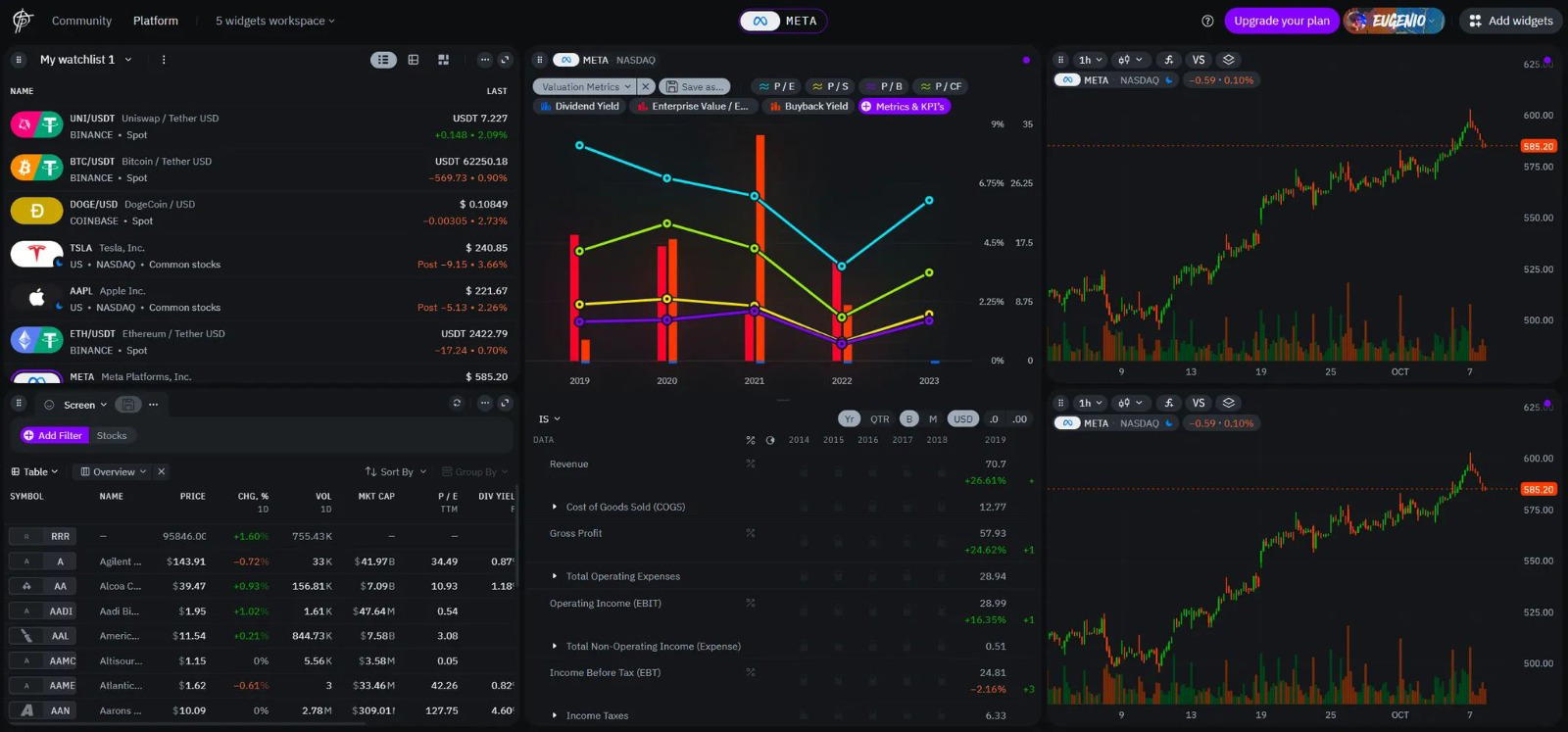
I’ve tried many trading platforms from the well-known like TradingView to more niche ones targeting specific types of traders. Recently I came across a new one called TakeProfit.com and was impressed with the customization and flexibility. After trying it out I found it to be a strong contender, especially for traders who value tailored workspaces and advanced technical analysis tools.
In this article I’ll compare TradingView, TakeProfit and other alternatives. I want to give you a clear overview of each platform’s pros and cons so you can decide which one fits your trading style and preferences best.
Why TradingView Alternatives?
TradingView has built a reputation as an all-in-one platform for technical analysis and market visualization. Its charting tools and user-friendly interface has attracted millions of traders worldwide. Even its most loyal users will admit that some of the platform’s shortcomings have become more apparent over time.
TradingView Frustrations
1. Pricing: Many traders have been frustrated with TradingView’s tiered pricing. Features like additional alerts, custom indicators or multiple chart layouts require higher tier plans and have priced out casual or budget conscious traders.
“I used to use TradingView’s basic plan for alerts but with the changes even a simple setup has become too expensive,” says one trader in a community forum.
2. Feature Restrictions: While TradingView offers Pine Script for creating custom indicators it has limitations. Complex strategies or integration with external data exceeds Pine Script’s capabilities and technical traders are looking for more advanced tools. Features like replay and saved layouts are limited on lower plans so users can’t expand their trading strategies without upgrading.
3. Customization: The fixed layouts and limited widget functionality makes it hard to create a workspace that matches individual trading workflow. For traders with multiple screens or assets this rigidity can slow down decision making.
4. Community: While TradingView benefits from its large community of shared scripts and ideas the platform has been criticized for monetizing community contributions without rewarding developers enough. This has discouraged many traders from fully participating in the platform’s ecosystem.
What Traders Are Looking For
As traders outgrow TradingView’s limitations they look for platforms that:
- Allow customized workspaces for individual trading style.
- Have robust tools for comprehensive market analysis, portfolio management and backtesting.
- Offer cost-effective access to advanced charting, real-time data and technical indicators.
- Support community but with fairer systems for contributors.
- Have reliable tools for automated trading and advanced analytics.
Platforms like TakeProfit address these gaps by being more balanced. By focusing on flexibility, affordability and innovation they cater to a wider range of traders from beginners to technical experts. In the next section we’ll see how TakeProfit is a modern trading platform.
TakeProfit: A New Kind of Trading Platform
TakeProfit stands out in the growing list of TradingView alternatives by focusing on flexibility, speed and collaboration. Unlike platforms that lock advanced features behind premium tiers TakeProfit takes a more open approach. Whether you’re a day trader, swing trader or long-term investor the platform’s customization and innovation allows you to create a trading space that suits your needs.
TakeProfit Features: Technical Indicators
- Flexible Workspaces One of TakeProfit’s main features is the drag-and-drop widget system, traders can organize their workspace however they like. Instead of being tied to a fixed layout users can:
- Create multiple workspaces for different trading strategies.
- Resize and reposition widgets to fit their workflow.
- Switch between setups instantly whether analyzing market movements or trading ideas across multiple assets.
This flexibility means traders can focus on what matters most without being restricted by the platform’s design.
- Python-Based Indie Programming Language For traders who use technical indicators and custom strategies TakeProfit’s Indie programming language is a game changer. Built on Python Indie allows users to:
- Create and deploy custom indicators with ease.
- Share or sell their scripts in the marketplace.
- Use Python’s vast libraries for more advanced data analysis and overcome TradingView’s Pine Script limitations.
- Advanced Charting with WebGL Technology TakeProfit’s WebGL charts are fast even with large datasets or complex technical analysis. Features include:
- Multiple chart types from candlesticks to heatmaps.
- Drawing tools to mark trends and patterns.
- Customizable indicators that fit your trading style.
- Tools that facilitate a detailed market analysis.
The charts are responsive and visually intuitive for technical traders and trend analysts.
- Real-Time Stock Screener The built-in screener helps traders filter opportunities fast using over 80 fundamental and technical parameters. Whether you’re stock trading or market analysis the screener has:
- Live updates in sync with the rest of your workspace.
- Real-time data to find high-probability trades.
- Advanced filtering options to narrow down your search.
- Single Tier Pricing Unlike TradingView that splits features across multiple tiers TakeProfit has a single plan. For $20/month (or $10/month with an annual subscription) traders get full access to all features including advanced charting, custom scripting and community tools.
How TakeProfit Solves Trading Problems with Trading Tools
TakeProfit was built with trader feedback in mind to solve the frustrations of traditional platforms:
- Customization: Unlimited layout options to create a workspace that suits your trading style.
- Transparency: Simple pricing model with no upselling like most platforms.
- Collaboration: Marketplace for developers and traders to share trade ideas and custom indicators.
TakeProfit vs Competitors
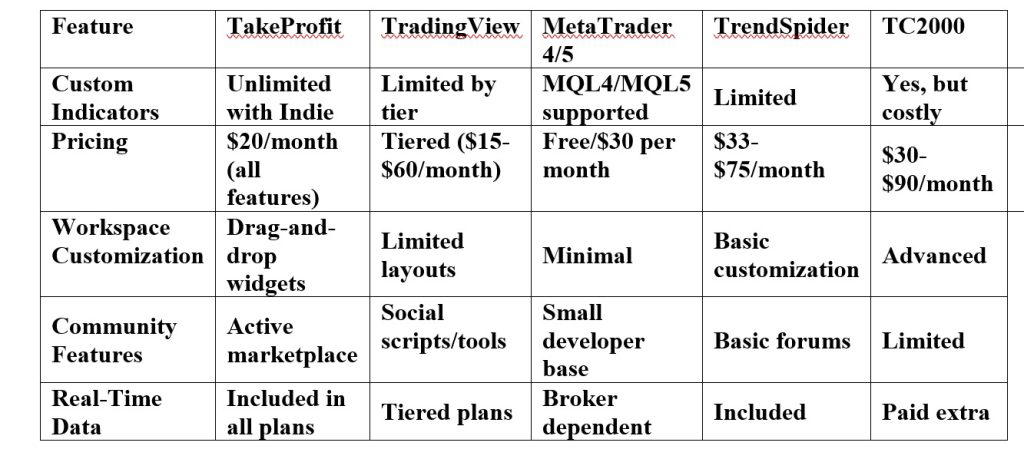
Choosing a trading platform is all about how it compares to others in terms of features, pricing and usability. TradingView has been the norm for years but platforms like TakeProfit and others are introducing new ways of technical analysis and trading tools. Here’s how TakeProfit compares to other TradingView alternatives.
Feature Comparison
Competitors
1. MetaTrader 4/5
(MT4/MT5) MetaTrader is popular among forex traders for its automation tools and Expert Advisors (EAs). While great for algorithmic trading its interface is outdated compared to TakeProfit’s modern design. MT4/MT5 also lack the charting customization and community-driven marketplace of TakeProfit.
2. TrendSpider
TrendSpider is known for its automated technical analysis, great for traders who rely on pattern recognition and real-time alerts. But higher price and limited customization options may not be ideal for users who want a more flexible workspace.
3. TC2000
TC2000 is great for stock scanning and technical indicators, especially for professional stock traders. But its pricing is much higher than TakeProfit and customization options while advanced aren’t as intuitive or flexible.
4. TradingView
The biggest competitor, TradingView is popular for its social features and Pine Script based custom indicators. But many traders find the tiered pricing and restrictions on alerts and layouts frustrating. TakeProfit has all features at a flat rate and more flexibility for workspace design and scripting.
5. NinjaTrader
NinjaTrader has advanced backtesting and lots of charting options but lacks the modern interface and community focus of TakeProfit. It’s better for algorithmic traders who prioritize technical tools over user experience.
Why I chose TakeProfit
1. All Features at a Lower Cost
Unlike TradingView’s tiered subscriptions, TakeProfit has all features—custom indicators, advanced charting and stock screener—at one low price.
2. Modern and Flexible Workspace Design
The drag-and-drop widget system is perfect for active traders who need to adapt fast to market changes. Whether you’re monitoring digital assets or doing detailed technical analysis TakeProfit’s flexibility ensures a smooth experience.
3. Community Ecosystem
The marketplace is integrated so traders and developers can share and monetize trade ideas, indicators and strategies.
4. Real-Time Data and Charting
With WebGL technology TakeProfithas high-speed performance without the latency issues of many web-based platforms. This is important for traders who need real-time data to trade directly.
Use Cases
TakeProfit is flexible and has advanced tools for all types of trading styles and preferences. Whether you’re a day trader looking for real-time insights or a long-term investor analyzing market trends TakeProfit has you covered.
1. Day Trading: Speed and Accuracy
Day traders need fast and reliable data and a simple interface to trade short-term opportunities. TakeProfit has:
- Real-Time Market Data: Get price movements and key market movements with minimal latency.
- Custom Alerts: Set unlimited real-time alerts for specific price levels or technical indicators.
- Dynamic Workspaces: Have multiple charts, watchlists and screeners side by side for instant decisions.
Example:
- Main Chart: 1-minute candlestick patterns.
- Watchlist: For highly volatile stocks or forex pairs.
- News Feed: For market-moving news.
2. Swing Trading: Analysis and Execution
Swing traders need to do analysis to hold positions for several days or weeks, which requires a well-defined trading strategy. TakeProfit has:
- Advanced Charting: Analyze trends with Fibonacci retracements and moving averages.
- Stock Screener: Find assets that meet specific technical and fundamental criteria.
- Custom Indicators: Use Indie (Python-based) to create custom metrics for trend identification.
Example:
- Primary Workspace: Weekly chart for long-term analysis.
- Secondary Indicators: Overlay RSI and MACD to confirm trend momentum.
- Screener Widget: Filter stocks with good historical data performance.
3. Long-Term Investing: Detailed Market Analysis
Investors who want in-depth research and portfolio management will benefit from:
- Fundamental Analysis Tools: Financial metrics and company data to evaluate long term opportunities.
- Portfolio Tracking: See asset performance and allocation in real-time.
- Cloud-Synced Notes: Store investment ideas and strategies for later.
Example:
- Portfolio Widget: Sector allocation and performance metrics.
- Fundamental Data: Shows financial health metrics like P/E ratios.
- Notes Section: Stores ideas for later review.
4. Algorithmic Trading: Automated Technical Analysis and Backtesting
Algorithmic traders need robust scripting environments and backtesting tools. TakeProfit has:
- Indie Programming Language: Write and test complex strategies with Python-like simplicity.
- Cloud Deployment: Run and share custom scripts without performance issues.
Example:
- Code Editor: Build scripts for automated technical analysis.
- Collaboration: Share scripts with the community for feedback and improvement.
5. Community and Educational
TakeProfit’s community features make it perfect for those who value shared knowledge:
- Marketplace: Browse and buy indicators or strategies from others.
- Shared Layouts: Collaborate with others by exchanging workspaces.
- Educational Resources: Community tutorials, support and examples to improve trading skills.
Example:
- Marketplace: Top rated stock ideas and users’ indicators.
- Interactive Charts: Community provided strategies to apply in practice.
- Educational Content: Learn more about the markets.
A Platform For All Stages
TakeProfit’s features are designed for traders at every level. Its adaptive workspaces, full features and community makes users can improve their trading skills, test complex strategies and be trading efficient in any market.
In the next section we’ll see why TakeProfit is one of the best TradingView alternatives and how it will shape the future of trading platforms.
Summary
Looking for a TradingView alternative? Most traders are searching for more flexible tools, cheaper pricing and customisable features. TakeProfit is a new platform that solves many of the problems traders face, with an innovative approach to trading tools, community and workspace.
Why TakeProfit
1. Flexibility: With its drag-and-drop workspace and unlimited layout options, TakeProfit fits to any trading style and preference.
2. Advanced Tools for Analysis: Indie scripting with Python, low-latency WebGL charts and advanced stock screener for both beginners and advanced traders.
3. Simple Pricing: Single tier pricing ($20/month or $10/month annual) no tiered subscriptions like TradingView.
4. Community Ecosystem: Marketplace and community tools to share knowledge and monetize strategies or benefit from others.
Is TakeProfit for You?
TakeProfit is perfect for:
- Day Traders: Those who need real-time data and custom layouts for quick decisions.
- Swing and Long-Term Traders: Those who need advanced charting, backtesting and fundamental analysis tools.
- Algorithmic Traders: Developers who want a robust scripting environment without Pine Script limitations.
- Collaborative Users: Traders who want an active community and to share or buy custom tools.
Summary
- TakeProfit is a combination of the best of traditional trading platforms and solves many of their problems.
- It has features for all trading styles, so it’s one of the best TradingView alternatives for 2025.
- With its new tools, community and analytics integration TakeProfit changes the game for traders.
Conclusion
If you’re tired of the limitations of current platforms or want to improve your trading, try TakeProfit. The free trial allows you to test its features and customizable trading environment before you buy.
Disclaimer
Comments expressed here do not reflect the opinions of Vanguard newspapers or any employee thereof.